Prowlarr indexers show "unavailable" or stay blocked by Cloudflare
· Updated 18 September 2026 · SparkBox team
You open Prowlarr and every indexer has a red "unavailable" mark, or a specific Cloudflare-protected site stays blocked even though you tagged it for FlareSolverr. In almost every case this is one of three things: a VPN tunnel that hasn't finished reconnecting after an update, a FlareSolverr proxy that was never actually registered, or a "you haven't added an indexer yet" setup state that only looks like a fault.
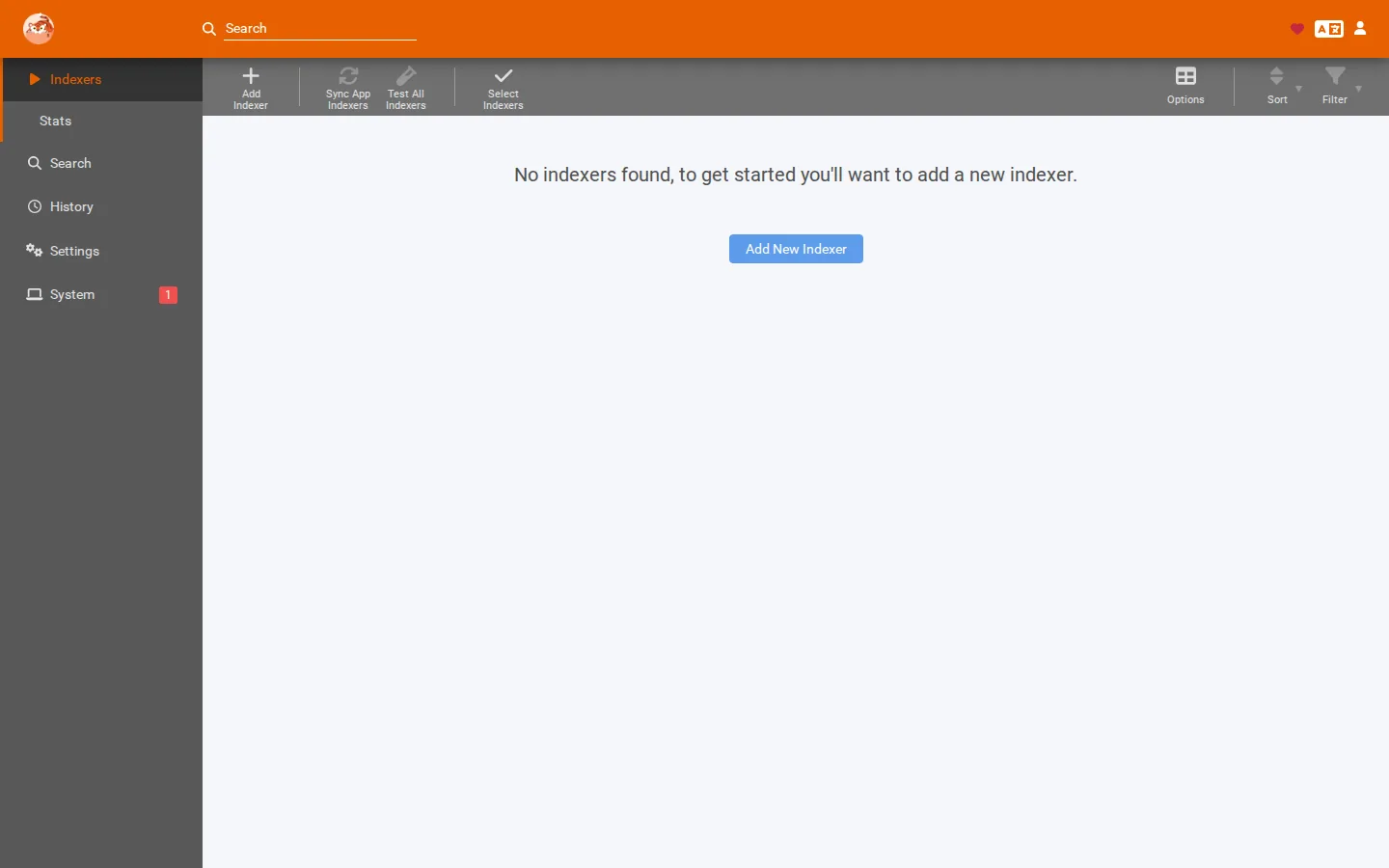
The 10-second version: If Test just spins on a new source, press it once and wait up to two minutes — SparkBox answers the "are you human?" check for you, it is only slow (details). If indexers went unavailable right after an update, wait for the VPN to reconnect, then restart your media stack. On current SparkBox the helper and its tag are set up for you; on an older or hand-configured setup where one Cloudflare site stays blocked despite a FlareSolverr tag, check that a FlareSolverr entry actually exists under Settings → Indexers → Indexer Proxies — the tag is useless without it.
First, know what you're looking at
Some terms used throughout, in plain English:
- Indexer — a search source Prowlarr queries (a tracker or Usenet index). Prowlarr passes results on to the download apps in your stack.
- Indexer proxy — a helper Prowlarr routes certain indexer requests through. FlareSolverr is one of these.
- FlareSolverr — a small service that solves Cloudflare's "are you human?" challenge so Prowlarr can reach sites protected by it.
- VPN tunnel — the encrypted link some setups route all download traffic through. If it's down, Prowlarr can't reach anything outbound.
Match your symptom to the right section below. Fixing the wrong cause wastes time.
Test spins for about a minute, then works — or fails
You add a source, press Test, and the spinner just keeps going. This is usually not a fault. Some sources sit behind an “are you human?” check (Cloudflare). SparkBox answers that check for you with its built-in helper (Byparr), and every source you add is routed through the helper automatically, so there is nothing to tag or configure. But the helper has to open a real browser page and wait for the check to clear, and that takes time: often 30–60 seconds, and longer through a VPN, because sites challenge VPN and data-centre addresses harder than home connections.
- Press Test once and wait. Give it up to about two minutes. Pressing it again (or pressing Save while a Test is still running) starts another check that waits behind the first one, which makes each of them slower and can push one past its time limit.
- A green tick means the source works. Searches through that one source can stay a little slower than the others while the site keeps its check up; sources without the check are not affected.
- If it keeps failing after a full wait, the site is refusing your VPN's current address. Switch the VPN to another country (the dashboard's VPN settings, or ask Tom AI to change your VPN location) and test again, or use a different source that isn't behind the check.
sparkbox doctorreads the helper's log and tells you when this is happening.
What SparkBox does for you: it runs the helper, registers it in Prowlarr, gives it up to two minutes per check, and tags every source (including ones you add later) so the helper is used whenever a site shows the check — and only then, so sources without the check are not slowed down at all.
Cause 1: Indexers went "unavailable" right after an update
This is the most common one and the most misleading, because every indexer fails at once, which feels catastrophic. It usually isn't.
When you update, your networking layer restarts. If your download traffic is routed through a shared VPN tunnel, that tunnel takes a few seconds to a couple of minutes to re-establish. During that window Prowlarr keeps trying to open outbound connections and they all fail. In the Prowlarr log this shows up as raw .NET connection errors — lines mentioning HttpConnectionPool.ConnectAsync and TCP-connect failures. That fingerprint is the tell: it means the network path itself is down, not that any individual indexer rejected you.
Fix it
- Confirm the VPN is actually up. Check whatever tool manages your tunnel and wait until it reports a live connection. Don't skip this — restarting Prowlarr before the tunnel is back just reproduces the same failure.
- Restart the media stack. Prowlarr caches its indexer health state, so it won't automatically re-test everything the instant the network returns. Restart the media services so it re-opens connections cleanly. On SparkBox that's
restart media; on other setups, restart the Prowlarr container or service. - Re-test in the UI. Open Prowlarr's top-level Indexers page and use Test All Indexers, or wait for the next scheduled health check. The red marks should clear.
Gotcha: If indexers are still unavailable after a clean restart and a confirmed-up VPN, the problem is no longer transient — move on to Cause 2 (for Cloudflare sites) or check the individual indexer's login/API key.
Current SparkBox does the tagging for you. Since late August 2026 every search source is routed through the Cloudflare helper automatically — on every start and within minutes of adding a source — and the helper only steps in when a site actually shows a challenge. You should never need to touch a tag. The manual steps below are for older boxes, or if you turned that off (SB_SOLVER_AUTOTAG=false).
Cause 2: A Cloudflare-protected indexer stays blocked despite the FlareSolverr tag
This is the trap that catches almost everyone who enables FlareSolverr after their initial setup. You add the flaresolverr tag to the indexer, save, and… the site is still blocked. The tag looks right, so it feels like a Prowlarr bug.
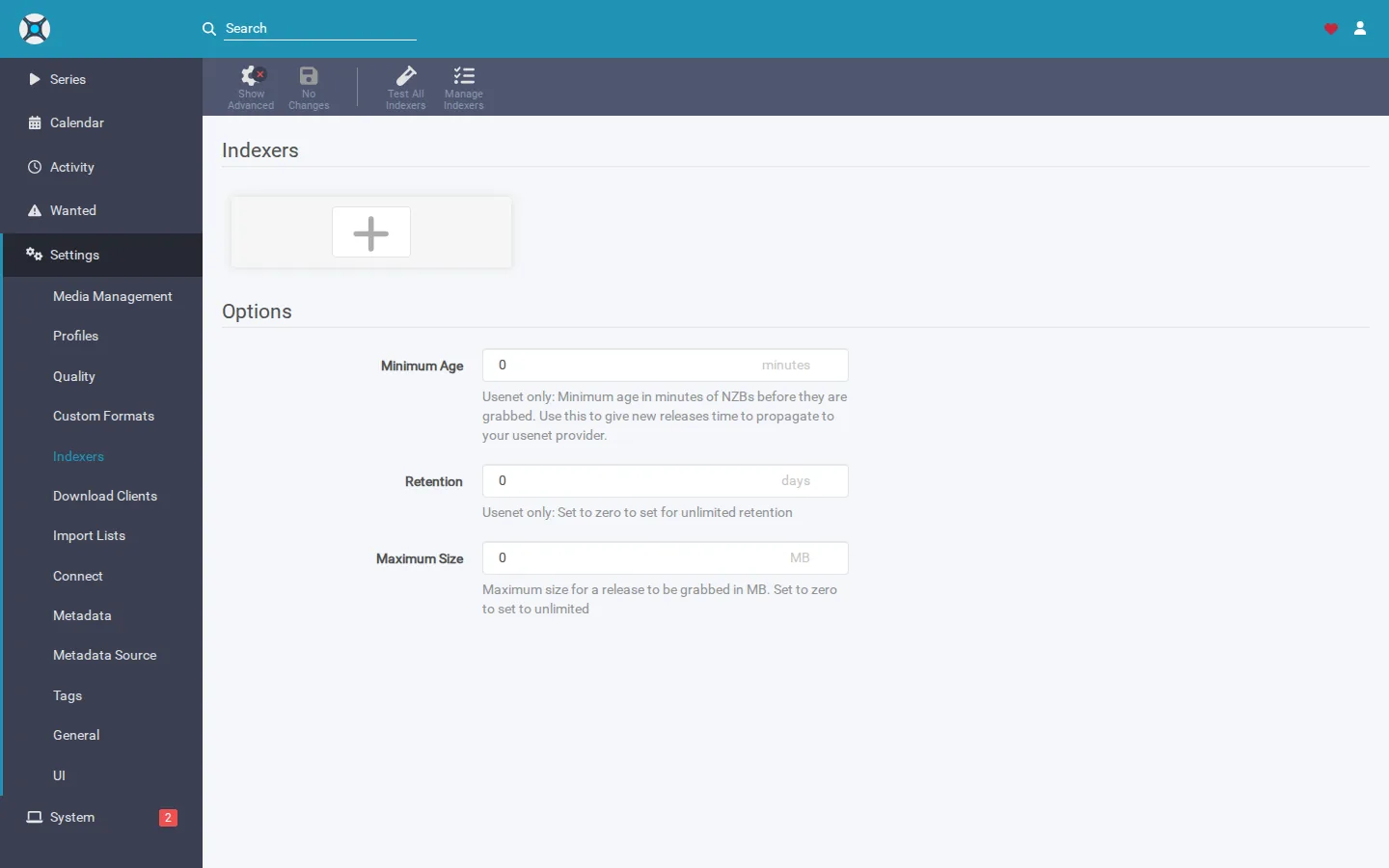
Here's the mechanism. The flaresolverr tag is only a label. It tells Prowlarr which indexers should be routed through a FlareSolverr proxy — but it does nothing unless a FlareSolverr proxy entry actually exists in Prowlarr. That entry lives under Settings → Indexers → Indexer Proxies. If it was never created, the tag points at nothing, and the request goes out un-proxied and gets blocked by Cloudflare.
Why does the entry go missing? On automated setups, the proxy is registered during the initial bootstrap pass. But if FlareSolverr is only enabled later, that bootstrap doesn't necessarily run again — so the proxy registration step is skipped, and you're left with a tag and no proxy behind it.
SparkBox note: A security change stopped exposing FlareSolverr's port on the host, but the old bootstrap probe still checked for it through the host at 127.0.0.1:8191. That probe silently timed out and logged "skipping proxy registration," so the FlareSolverr entry never got created for anyone who turned the profile on after install. Current SparkBox re-fires the bootstrap self-heal on every sparkbox up when the FlareSolverr container is running, which recreates the missing proxy automatically. If you're on that build, the manual steps below are done for you.
Fix it manually
- Confirm FlareSolverr is running. The proxy is useless if the service behind it isn't up. Check that your FlareSolverr container/service is running and healthy.
- Open Settings → Indexers → Indexer Proxies in Prowlarr. Look for a FlareSolverr entry. If there is none, that's your problem.
- Add a FlareSolverr proxy. Click to add a new proxy, choose FlareSolverr, and set the Host to the address Prowlarr can actually reach FlareSolverr on. On SparkBox that is
http://localhost:8191/, because Prowlarr and the helper share the VPN container's network; on other setups it is usually the service name and its port (for examplehttp://flaresolverr:8191/). Set Request Timeout to120— a slow check through a VPN can take more than a minute. Give it a Tag offlaresolverr— type it and press Enter so it appears as a chip; clicking out of the field first discards a tag you've only typed. - Match the tags. The tag on the proxy and the tag on the indexer must be identical. Prowlarr only routes an indexer through a proxy when they share a tag. Confirm your Cloudflare indexer carries the same
flaresolverrtag (type it and press Enter so it saves — Prowlarr drops a tag you've only typed if you click away). - Test the indexer. Save, then test the previously-blocked indexer. It should now succeed.
Gotcha: Using 127.0.0.1:8191 as the FlareSolverr host only works if that port is genuinely reachable from inside the Prowlarr process. On many modern setups the port is deliberately not published to the host for security, so use the internal service address instead. This is exactly the mismatch that caused the silent skip described above.
Cause 2b: The proxy is fine, but FlareSolverr can't pass this site's check — switch to Byparr
If the proxy entry exists, the tags match, and the indexer still fails its Test with a Cloudflare or "challenge" error — and especially if it used to work and stopped — you have hit the other half of this story. Cloudflare keeps changing its "are you human?" page, and FlareSolverr (the original helper) has fallen behind on the newer versions. Its log says things like Challenge not detected or times out, and Prowlarr shows the misleading "Unable to connect… DNS/SSL" for the site.
Byparr is a newer stand-in that passes those checks. It is the default helper on SparkBox since late August 2026 — a box set up before that is switched to it automatically on its next update. If yours is still on FlareSolverr (App Store → Media shows the toggle off), swapping takes one toggle:
- Dashboard → App Store → Media → Use Byparr instead of FlareSolverr → On → Save. The Media apps restart (a minute or two).
- Nothing else changes. Byparr answers on the same address and port FlareSolverr did (
8191), so the proxy entry in Prowlarr and theflaresolverrtags keep working as they are. - Prowlarr → Indexers → Test the previously blocked source. Prowlarr also re-tries benched sources on its own within a few minutes.
The dashboard's Media pipeline card now spots this pattern for you: when every Cloudflare-routed source is down at once and you are still on FlareSolverr, the Indexers step says so and points at the toggle.
Already on Byparr? Three things people trip on
- The tag is still called
flaresolverr, and it appears on every source by itself. Both expected. The tag only tells Prowlarr "route this through the challenge helper"; Byparr is the helper now, and SparkBox adds the tag for you so walled sites just work. Don't rename it, and don't add a second one. If you deliberately take it off a source, SparkBox leaves that source alone from then on. - Byparr restarts over and over. Its built-in browser needs shared memory; SparkBox gives it a real
/dev/shmsince the fix in the app pack. If yours still loops, Update the box, then Apps → Byparr → Restart. - A source is still blocked even on Byparr. Test it in Prowlarr and read the error. If it still names Cloudflare, that site's current check is beyond both helpers for now — try again in a day (these things move), or add a source that isn't walled. If the error names login, API key or DNS instead, it was never a Cloudflare problem.
Cause 3: Prowlarr says "add an indexer" — and that's not a fault
If Prowlarr (or a dashboard summarising it) shows something like "add an indexer" or "one media setup step left," and you've never actually added an indexer, nothing is broken. This is a setup state: Prowlarr is healthy, it just has nothing to search yet.
It's easy to misread because an unconfigured indexer stage and a genuinely failing indexer can look similar at a glance. The distinction that matters: a setup state means you never configured it; a fault means something you did configure has now stopped working (VPN, downloads, storage, or an indexer login).
Fix it
- Go to Indexers → Add Indexer. Add at least one indexer and fill in whatever it needs (URL, login, or API key).
- Test and save. Once one indexer is present and passing, the "add an indexer" prompt clears.
- Don't chase a phantom fault. If your dashboard was showing this as green/neutral rather than red, that was intentional — it's a to-do, not an outage.
Frequently asked
Why are my Prowlarr indexers unavailable right after an update?
An update restarts your networking, including any VPN tunnel Prowlarr routes through. While the tunnel is still reconnecting, every outbound connection fails and all indexers show unavailable. The log shows raw .NET TCP-connect failures. Once the VPN is back, restart your media stack and they recover.
I applied the flaresolverr tag but a Cloudflare-protected indexer is still blocked. Why?
The tag alone does nothing. There must be a matching FlareSolverr entry under Settings → Indexers → Indexer Proxies, tagged with the same value. If FlareSolverr was enabled after your initial setup, that proxy entry may never have been created, so the tag routes to nothing and the site stays blocked. On current SparkBox the proxy and the tag are both set up for you automatically, so there is nothing to tag; if Test only spins, press it once and wait up to two minutes.
Prowlarr's Test button spins for a minute on a new source. Is it broken?
Usually not. Some sources sit behind an “are you human?” check. SparkBox answers it for you automatically, but the first check can take up to about a minute (longer through a VPN), so press Test once and wait. Clicking again only queues more checks behind the first. If the same site keeps failing, switch the VPN to another country or use another source.
Prowlarr says "add an indexer" — is something broken?
No. That's a setup state, not a fault. It means Prowlarr is healthy but has no indexers configured yet. Add one under Indexers → Add Indexer and the prompt clears. Real faults show connection or authentication errors on indexers you already added.
The proxy and tags are right but a Cloudflare site still fails. Now what?
Switch the helper to Byparr: App Store → Media → "Use Byparr instead of FlareSolverr" → On. FlareSolverr can't pass the newer Cloudflare checks; Byparr can, on the same port, so nothing in Prowlarr needs changing.
Does restarting fix a Prowlarr indexer marked unavailable?
Often, when the cause was a transient network or VPN drop — restarting forces Prowlarr to re-open connections after the tunnel returns. If it's still unavailable after a clean restart with a confirmed-up VPN, the problem is the indexer itself or your proxy setup.
Skip the proxy plumbing
SparkBox runs Prowlarr with its indexer bootstrap and FlareSolverr proxy wired up, and re-heals the proxy registration automatically on start if it ever goes missing.
Questions, or did this not match your box?
Every guide here came from a real problem someone hit. If yours behaves differently, say so — that is how these get corrected, and how the fix gets prioritised.
We answer there rather than in a comment box, because that is where the people who have already solved it are.