Out of beta — in production · free forever · one command · your hardware
Automatic self-hosting is here.
One command, then SparkBox does the part that normally eats a weekend: 35+ apps installed, the media stack wired behind a VPN with a kill switch, API keys swapped between them, SSL issued, backups scheduled. You paste one VPN key — it handles everything else.
SparkBox cuts your monthly bills and gives you self-hosting back: what usually bills you monthly runs on your own hardware. SparkBox is free; Legend is a one-time purchase that never renews. See what your subscriptions add up to →
New here? Follow the first successful setup checklist →
One command
UGREEN or Synology NAS, any Linux server, or a cheap VPS. Paste it into a terminal and let it run.
Any x86-64 Linux · 40 GB free · ~15 min
One-click installer
Download and run it. SparkBox sets up its own Linux engine inside Windows and installs everything — then puts a real app on your desktop.
Download for WindowsWindows may say “unknown publisher” the first time — that’s normal for a new app. Click More info → Run anyway. Windows setup guide →
Windows 10/11 · 40 GB free · ~15–40 min
Run it on Linux
There’s no native Mac build — macOS’s Docker can’t do the container networking SparkBox relies on. The simple path is a small Linux box: an always-on mini PC, an old laptop, or a low-cost VPS.
See the options →A VPS from a few dollars a month works great, and you reach it from your Mac like any other app.
Apple Silicon & Intel · via a Linux host
No account. No card. Runs on any spare PC, VPS or NAS. One command exports everything back to plain Docker files.
Live from the fleet
870+ homes have installed SparkBox.
Here is what Legend backers and other users say, in their own words — every quote links to where they said it.
-
“… Having cobbled together arr stacks in Windows thrice before, I'm excited that I was able to get all going in one foul swoop with such an accessible and beautiful interface! … Many many thanks!!”
DjunaBug★ LEGENDDemox ↗
-
“I didn't even know ther was a service passwords tab in setting. That's exactly what I need to get into Nginx. Thank you so much!”
SSJNobleSix★ LEGENDDemox ↗
-
“That fixed the volume size issue, thank you. I restarted the SparkBox, had the Doctor do a health check and they returned All Checks Passed! I can now access the web interface and Everything's Running Smoothly. Thanks again.”
cprs★ LEGENDDemox ↗
-
“That was one of the nicest installs I have done in a long time, super fast too — and this interface you came up with is gorgeous, I love it. A couple of small glitches, and your own prompts pointed me to the fixes.”
@BadBunny
-
“Thank you so much that worked! Just to clarify the steps I took - I followed everything you said to do and none of it worked until I changed the networkingMode=NAT and that fixed it. Have a good rest of your day and thank you for the help Chris”
fireballe123★ LEGENDDemox ↗
-
“Thank you, mounting it directly to the /opt/sparkbox/data/audiobooks folder works like a charm :)”
zebraelch★ LEGENDDemox ↗
-
“Thanks for that Tom, The module copy appears to have done the trick and now running on the laptop rather than the more power hungry Dell tower. …”
paulrturnbull★ LEGENDDemox ↗
-
“Damn dude! Just set up something similar and it took me weeks. This is amazing.”
@DarkStorm909
-
“… I have read though some trouble shooting forums and Tom AI helped me get the graphics card configure to work with the programs. … Thank you for all of the help”
SenorMuffinTop★ LEGENDDemox ↗
-
“Thanks everyone for the help! I now have SparkBox dashboard up and running with zero errors I am very excited to start self hosting with all these available apps! The Vm was way smoother than the container for setup.”
Technofly17★ LEGENDDemox ↗
-
“SUCCESS!!! I was able to log into Portainer with the generated creds! The speed at which you are getting these bugs dealt with is so cool to see in real time. … Thanks to you, I am quickly getting more familiar with Linux CLI”
GamerX06★ LEGENDDemox ↗
-
“thank you, i had a lot of trouble trying to set up the arr stack a while ago, and SparkBox makes everything easy and pre-configured. … thanks again!”
@blinkandnumberoneYouTube ↗
-
“… Great! That seems to have sorted out the app +VPN issues, and everything is loading and running well. …”
hotdogtown★ LEGENDDemox ↗
-
“Thanks! … Was able to install TomSparkBox finally, thanks to your help! …”
mtechnic★ LEGENDDemox ↗
-
“I updated SB from .240 to .245, and then requested all apps be updated... and it worked! First time in a couple weeks, so that's great news! I'm not sure what changed from 240 to 245, but thank you!”
mrgrue★ LEGENDDemox ↗
-
“Yay! My box was one of the ones that you helped me manually update every time. Enough to where I recognized the command posted. Thank you for your hard work. I'm happy to know that it will update with a press of a button now.”
pereze94ULTIMATEDemox ↗
-
“That did it. I did run SparkBox up after creating the folder, but I created media/data/TV instead of just media/TV. I got it running and have confirmed I can watch videos both on my desktop and on other devices on the network. Thanks so much for creating SparkBox and all the help getting it set up!”
skylyn★ LEGENDDemox ↗
-
“Awesome! Tysm I really appreciate it, this is a great program you've made. Definitely makes the *arr things less intimidating to a newbie”
squid★ LEGENDDemox ↗
257 quotes from 163 people — 117 of them from Legend backers.
Live project growth
Live from the public install counter, the same number as the top of this page. View the fleet →
Safer updates
Built to catch breakage before it reaches your box · 6 in May → 2,637 today
Tom AI finds the right source
189 of 241 questions matched correctly · up from 182 · Sep 2026
The dashboard
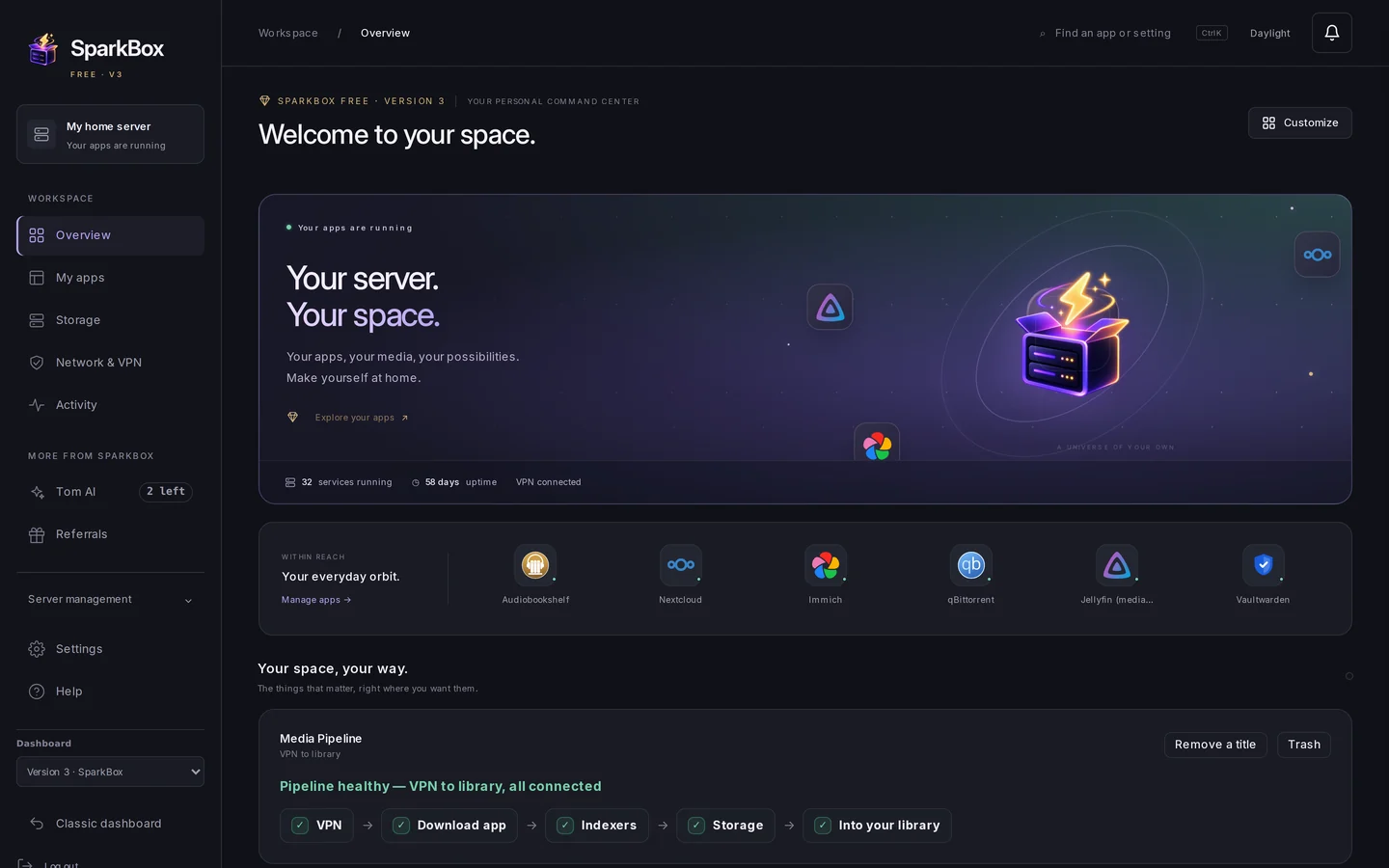
It was configured before you logged in.
The wiring most people spend a weekend on — VPN kill switch, API keys between apps, SSL, backup schedule — is already done when the dashboard opens. What’s left is point-and-click: turn apps on, read logs, restore a backup. No port numbers, no YAML.
Toggle a module, watch real install progress, RAM estimate shown before you commit.
The media stack rides a VPN with a kill switch and talks to itself on first boot.
Hands-off automatic updates with rollback on every box, and encrypted backups you can download from the GUI.
What’s inside
35+ apps, already introduced to each other.
Photos, streaming, cloud storage, passwords, ad-blocking, documents, cameras, local AI. Real upstream projects — nothing we reskinned and renamed.






















…and 11 more in the catalog. See the full list →
Downloads
Everything we make, in one place.
The box, the chat, the tools — each one downloads from our own servers, installs in minutes, and keeps your data on your hardware.
The private home server itself. One command on Linux or a NAS, a one-click installer on Windows.
Your own encrypted group chat — free on every SparkBox, self-hostable anywhere, or hosted by us.
Voice dictation that types into any app on your PC — processed on your machine, not in a cloud.
Fast desktop notes saved as plain local files. Yours to grep, back up, and keep forever.
Step-by-step setup guides for every app and game server, written for people who don't live in a terminal.
Questions, feature requests, and patch notes — the SparkBox community answers fast, no account tracking.
The VPN we recommend
Surfshark is the go-to VPN for SparkBox.
All media-app traffic rides through a VPN kill switch, so the provider matters. SparkBox is built and tested against Surfshark, and we keep checking that choice with data instead of payout tables.
No throttled "streaming-only" exits. The SparkBox wizard can pick any Surfshark server and your downloads just work.
One plan covers the NAS plus every phone, laptop and TV in the house. No juggling seats.
A VPN client rewrites your routing table, so it has to stay maintained. vpnupdates.app checks every provider's apps against the public app stores every day, and Surfshark keeps shipping on every platform. How it is calculated →
Affiliate link — supports SparkBox at no extra cost to you. Any gluetun-compatible provider still works with SparkBox; Surfshark is the one we build, tune and test against.
Game servers
Your worlds, always on. No monthly server bill.
One click installs a dedicated server on your own hardware. Friends join from the game with your address, the world keeps living while your PC is off, and every save stays on your box — nothing expires when a subscription does.

A friendly web panel creates and runs worlds, takes backups, and shows who's online. No command line.

The factory grows around the clock. First start generates the map; friends connect straight from the game.

A Viking world that doesn't sleep when the host logs off. Password-protected out of the box.

The lightest server in the catalog — a shared world in well under a gigabyte, with a join password ready.

The Minecraft your kids play — phones, tablets and the Windows app join directly. About 1GB, no Realm subscription.

Co-op zombie survival that keeps ticking between sessions. Admin and join passwords generated for you.
Unlike the media apps, game traffic deliberately skips the VPN — your friends need a stable address. Want another game supported? Ask in d/sparkbox — Factorio, Valheim and Terraria all landed as community requests.
The assistant that fixes your server
Generic AI has never seen your server.
Tom AI works with your box.
Tom AI can inspect your box’s logs, container state and media connections, explain what it finds, and propose supported repairs. You approve an action before it runs; then check whether your original problem is resolved.
Diagnostics run on your box. Tom AI uses cloud AI: sanitized messages and diagnostic context are sent through our service to the AI provider. See what is shared.

What it actually does
Four things a chat window can't do.
It's on your box, not in a chat window.
It reads your real logs and live container state, tells you what broke in plain English, and applies the fix on your tap (agent fixes in beta) — not three hours of searching forums. How it works, with real fleet numbers →
It checks its own work.
Every fix is verified right after it runs — and automatically undone if it made anything worse. You get a fix, not a gamble.
It fixes from proof, not guesses.
Common problems arrive with a track record from real SparkBox machines — the answer the fleet already validated, not a plausible-sounding suggestion.
It gets smarter every week.
The system learns which fixes actually hold up on real boxes and keeps sharpening — support you pay for once that keeps improving, free, forever.

Who’s behind it
Made by Tom Spark.
Privacy advocate, VPN reviewer, certified GEEK. He’s been teaching people to build exactly this for years — over a million views of server tutorials, distilled into one command.
See the live SparkBox fleetTom Spark Reviews on YouTube
SparkBox is for media you have the right to store and stream — your own recordings, discs you own and have ripped, licensed and public-domain material. It includes no streaming catalogues and grants no rights to anyone's content, and a VPN does not change what is lawful to download. Follow the copyright law and licence terms that apply to you.
For the advanced crowd
"Why don't I just ask Claude Code to build this?"
Honest answer: you can get surprisingly far. An afternoon with Claude Code genuinely produces a compose file with Jellyfin, an *arr stack and a VPN — and we'd be the last people to sneer at that, because a lot of SparkBox is built with AI too, directed daily by a human who reads every bug report. Use the tools. They're great.
Here's what the afternoon doesn't get you. SparkBox is 700+ shipped releases over four-plus months of running on real hardware, and almost none of that work was "write the YAML." It was discovering, one stubborn box at a time, what the YAML meets in the wild — knowledge that isn't in any model's head, because until we hit it, it wasn't written down anywhere:
QNAP
Its BusyBox df rejects flags every other Linux accepts — and one bare variable assignment under set -e killed the whole installer with nothing but a stray curl error. You only learn that from a QNAP.
Synology
Some vendor OpenSSL builds report a perfectly healthy version string — and can't do ed25519 at all. A release-signature check has to know the difference between "tampered" and "this box's crypto is hollow."
qBittorrent
Its config is Qt INI. Wrap the password hash in quotes and login fails forever, silently. Unquote it and everything works. Nothing logs why. We know because we bled on it.
GPU transcoding
A GPU only attaches to a container when it's created — so hardware transcoding "randomly" dies after updates unless your update system can prove which container was born without its device, and recreate exactly that one.
Multiply that by UGREEN, Proxmox, TrueNAS, WSL and five VPN providers, and you get the real product: not the compose files, but the loop around them — a real fleet reporting real failures, fixes shipped the same day, and a public changelog you can audit line by line. That's the proprietary part. Not secrets — time. A fresh AI session starts from zero on all of it; ours starts from 700 releases of receipts.
And if you'd still rather build your own: genuinely, go for it — it's the best way to learn, and our guides will help you even if you never install SparkBox. The apps underneath are the same open-source projects either way, and the export command means choosing us never locks you in. SparkBox is for the day you want it to keep working while you're busy living.
FAQ
The questions worth asking.
Is it really free?+
The core app catalogue is free to install and run. Legend is an optional one-time $49 purchase for supporter features including Tom AI, My Vault, dashboard customization and guided tools. You do not need Legend to run the core apps. Compare what is included.
What if I want to leave?+
One command exports your whole setup to plain Docker Compose files. The apps underneath are all standard open-source projects, so you keep running them with or without us.
Why isn't the glue layer open source?+
The 35+ apps are open source and unmodified. The installer, dashboard and wiring are source-available: free to run on your own servers, not free to repackage and resell. That's what keeps this a full-time job instead of a weekend hobby.
What hardware do I need?+
Start with a supported x86_64 Linux or NAS host with Docker, or use the Windows setup guide. RAM and storage needs depend on the apps you choose; photo indexing, transcoding and local AI can require substantially more resources. Start with a small selection and check each app’s requirements. Find your setup guide.
Which VPN should I use?+
Surfshark. It is the provider SparkBox is built and tested against: every server allows P2P, devices are unlimited, and it is the one whose apps we see maintained most consistently — we check every VPN provider's app update history daily at vpnupdates.app (methodology). Any gluetun-compatible provider still works if you already pay for one. Surfshark deal → (affiliate link, supports SparkBox at no extra cost).
Is it safe to expose to the internet?+
Keep the dashboard and app administration on a trusted network. Use the remote-access setup to choose private access or deliberate public exposure, and review each app’s authentication first. A VPN for download traffic does not protect a publicly exposed dashboard. Read the access guides.
Your server. Your data.
One command.
$ curl -fsSL https://get.tomsparkbox.com/install.sh | sudo bash